
Cinema is built on angles. The same scene, shot from a close-up, a wide shot, an aerial view, or from behind the character, tells a completely different story. A close-up creates intimacy and tension. A wide shot establishes context and isolation. An aerial view implies omniscience or scale. A back view places the audience in the character’s position, looking at what they’re looking at.
For human directors, choosing and shooting those angles is a craft built on decades of language and instinct. For AI video generation, it’s traditionally been a manual grind: write a prompt describing the angle, generate, check the result, rewrite the prompt, generate again — and watch the character drift slightly with every variation, because each generation is an independent event with no memory of the last.
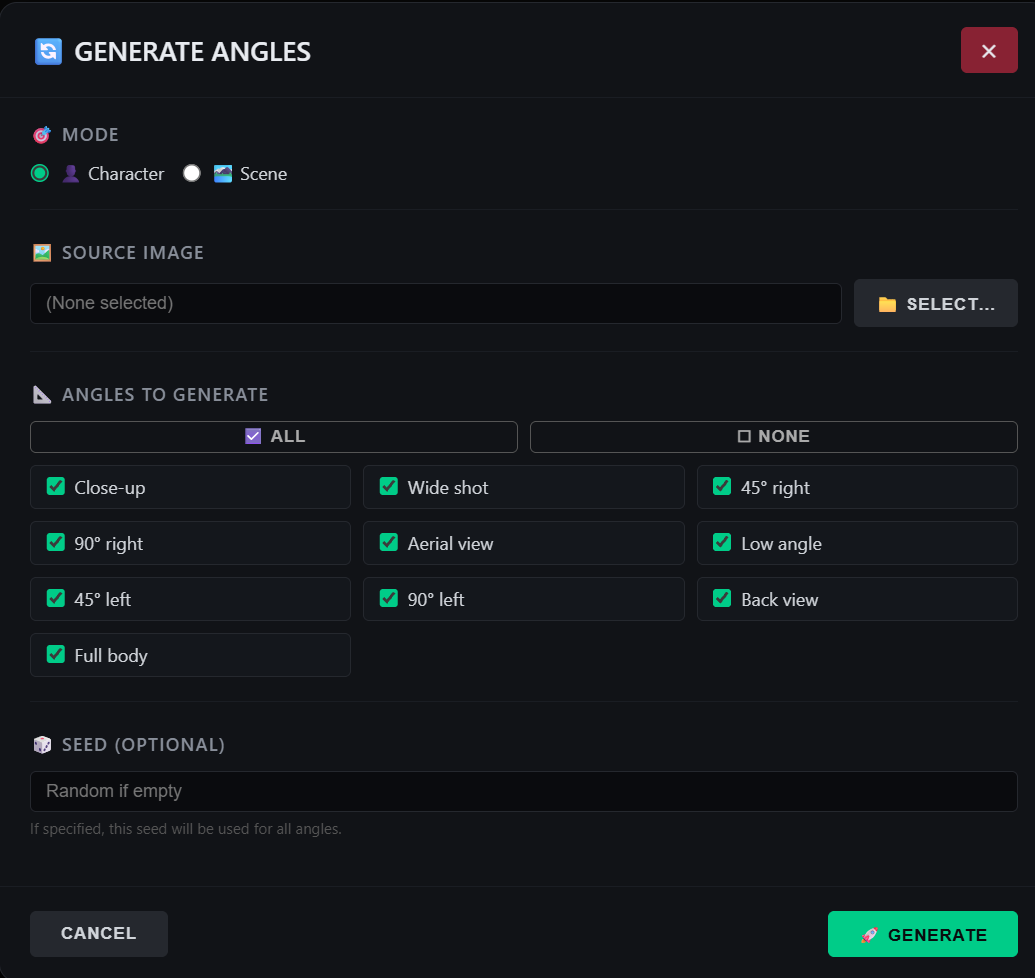
Latent Core’s Multi-Angles Generator collapses that grind into a single action. With one click, you generate ten different camera angles of the same character — close-up, wide shot, aerial, back view, and more — all anchored to the same reference asset, so the character stays recognizably themselves across every variation.
The Problem It Solves
The core difficulty in generating multiple angles of the same character isn’t the angle itself. Modern video models understand what a close-up or an aerial shot looks like. The difficulty is identity consistency. Generate a close-up and a wide shot of “a woman in a lab coat” from two independent prompts, and you’ll get two different women — different face, different hair, different proportions. The audience reads them as two characters, not one.
The Multi-Angles Generator solves this by tying every angle to the same Asset Manager entry. The character’s reference images, description, and prompt fragment are injected into each generation, so the underlying identity is locked even as the camera moves. The angles vary; the person doesn’t.
This is why the feature lives alongside the Asset Manager rather than as a standalone tool. It depends on the same multi-reference asset system that keeps characters consistent across timeline segments. An asset with a strong primary reference and a few supporting angles gives the generator the material it needs to hold identity across ten very different shots.
What You Get
The output is a set of ten camera angles, covering the vocabulary a director actually uses:
- Close-up — face and expression, intimate, high emotional weight.
- Medium shot — waist up, the workhorse of dialogue scenes.
- Wide shot — full figure in context, establishing geography.
- Aerial — overhead view, scale, omniscience.
- Back view — over-the-shoulder or from behind, subjective positioning.
- Three-quarter view — the classic portrait angle, flattering and dynamic.
- Low angle — looking up, power and threat.
- High angle — looking down, vulnerability or observation.
- Profile — side view, graphic and distinctive.
- And additional variations depending on the character and configuration.
The exact set is designed to cover the shots a storyteller most often needs, rather than an exhaustive catalogue of camera positions. Ten angles is enough to build a dynamic sequence — cut between a close-up and a wide shot, insert a back view for subjective moments, open with an aerial for establishing scale — without being so many that the output becomes unwieldy.
How It Fits the Workflow
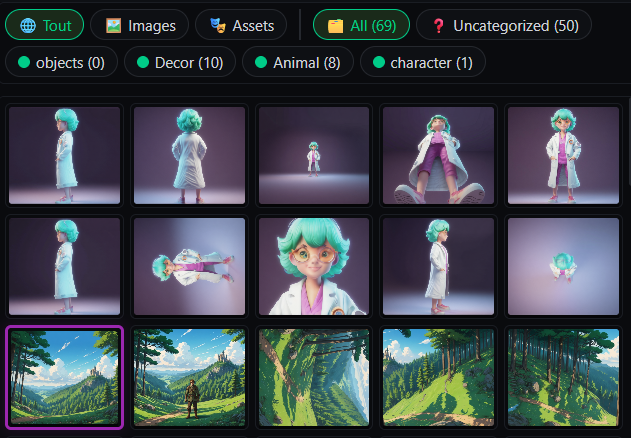
The generator is accessed from the Images panel header, alongside the Compositing Studio and V2V Editor buttons. You select a character asset — one that already has reference images and, ideally, an Auto-Describe pass to fill in its description and prompt fragment — and trigger the generation. The system produces the ten angles, each tied to the same asset identity.
The results land in your media library as individual images, ready to be used in several ways. You can set one as a presenter reference for a segment. You can capture a particular angle as a new reference image for the asset itself, enriching its multi-reference set. You can composite an angle onto a background in the Compositing Studio. Or you can feed an angle into the V2V Editor as a guide for retouching an existing clip.
In practice, the generator becomes a bridge between asset creation and scene production. You define a character once, generate their full angle set, and then draw on that set whenever a scene requires a specific shot. The character’s visual identity is established up front, and every subsequent generation inherits it.
Why One Click Matters
The “one click” framing isn’t just about convenience. It reflects a deeper principle in how Latent Core handles consistency: the system should do the bookkeeping so the creator can focus on the story.
Generating ten angles manually means writing ten prompts, each describing the character and the angle, each risking drift in identity, each requiring validation and possible regeneration. That’s ten opportunities for inconsistency and ten cycles of waiting. Doing it in one click means the character description is injected identically into every generation, the angle variation is handled systematically, and the output arrives as a coherent set rather than ten independent experiments.
This is the same philosophy that drives the Asset Manager’s sticky backgrounds and the resolver’s automatic slot assignment. The AI remembers your assets; the system injects their descriptions automatically; you direct. The Multi-Angles Generator extends that philosophy from continuity across time to continuity across perspective.
For Dynamic Storytelling
The phrase “perfect for dynamic storytelling” points at what the angles are actually for. A video that stays in one shot for its entire duration feels static, regardless of how good the generation is. Dynamic storytelling requires cutting — between scales, between perspectives, between emotional registers. A close-up followed by a wide shot creates a rhythm. A back view followed by an aerial creates a shift in power.
Without a consistent character across angles, that cutting is impossible: the audience sees a different person in every shot, and the illusion collapses. With the Multi-Angles Generator, the character survives the cut. You can build sequences that move between perspectives the way a real production does, because the identity underneath every angle is the same.
Ten angles, one click, one character. The rest is editing — and that’s where the storytelling actually happens.
Leave a Reply
You must be logged in to post a comment.