
Cloud video generators have trained creators to think in fragments. You type a prompt, wait, and receive a five-second clip — then you do it again. And again. A one-minute video becomes a dozen disconnected generations stitched together in a separate editor, each costing tokens, each losing a little more of your creative momentum. Latent Core was built to break that model entirely.
The Problem with the Clip-by-Clip Workflow
Anyone who has produced video with cloud AI tools knows the ritual. You generate a clip. You don’t like it. You regenerate — more tokens. You generate the next clip and it looks nothing like the first. The character’s jacket changed color. The lighting shifted. The background morphed. You spend more time fixing continuity than actually creating.
And when you finally have your clips, the real work begins: downloading them, importing them into an editor, manually cutting them together, hoping the result feels coherent. The tool that was supposed to save you time has quietly turned you into a full-time assembly technician.
Latent Core takes a fundamentally different approach. Instead of asking you to generate isolated moments, it asks you to write one script — and then handles everything else.
One Script, Unlimited Segments
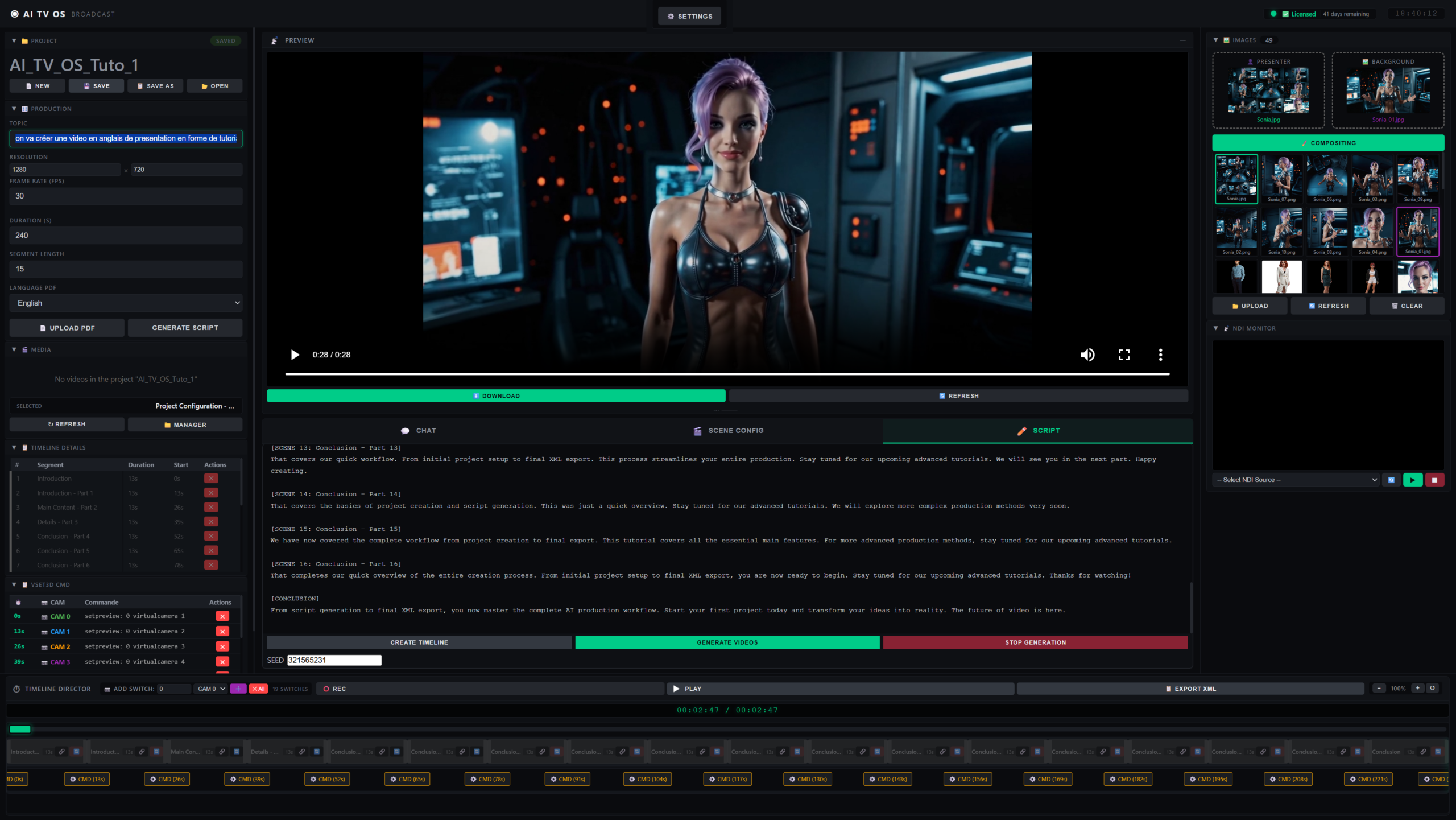
In Latent Core, you start with a topic. You type a subject or import a PDF, and the local AI (running through Ollama on your own machine) writes a structured script complete with a timeline and editable durations for each scene. You review it, adjust it, iterate on it in the chat if you want — and then, with a single click, you create the timeline.
The timeline is where Latent Core fundamentally diverges from cloud generators. Your script is automatically split into as many segments as you need. There’s no arbitrary limit. A 60-second explainer might have four segments. A ten-minute documentary could have forty. A training course could have hundreds. The system doesn’t care — and it doesn’t charge you differently.
Each segment lives on the bottom timeline as an independent, editable block. You can see its title and duration, and you can customize it individually: change the presenter image, swap the background, rewrite the dialogue, add reference images, or fine-tune the scene configuration. You can even set a specific seed for reproducibility. When a segment has custom settings, an override indicator appears, so you always know what’s been touched.
But the real magic happens when you generate.
Drag-and-Drop Timeline, One Synchronized Render
Instead of generating and downloading clips one by one, you generate within the timeline. You can regenerate a single segment by right-clicking it and choosing Regenerate — waiting anywhere from thirty seconds to fifteen minutes depending on the complexity. This segment-by-segment approach is the recommended method, especially at first, because it gives you total control.
When everything looks right, you can run a batch generation: all segments render one after another, and Latent Core assembles them into a single synchronized final video. Say goodbye to five-second clips and hello to full-length films.
This is where the Asset Manager becomes essential. Before each generation, Latent Core’s resolver scans the segment script for known assets — characters, locations, objects — that you’ve defined in your asset library. It matches by name and alias, assigns them to the appropriate generation slots, and injects their prompt fragments automatically. A character mentioned as “she” or “the biologist” will be detected even if the script never uses her formal name.
Equally important is the sticky background system: if a segment doesn’t mention a location but a previous segment did, the resolver automatically inherits the last detected background. This keeps visual continuity across scenes without you having to manually specify the same background over and over. The result is a film that looks like it was shot in one place, not assembled from a dozen disparate prompts.
Export to DaVinci Resolve, Broadcast-Ready
For professional workflows, the output of Latent Core isn’t a dead end. The entire timeline can be exported as FCPXML and opened directly in DaVinci Resolve. Your segments arrive with their edits intact, aligned in time, ready for color grading, audio mixing, or final delivery. NDI support means you can also monitor any network video source in real time, and FreeD camera control lets you drive virtual PTZ cameras in 3D set software — useful for broadcast and virtual production environments.
This is the difference between a tool that produces clips and a tool that produces productions. A regional TV station can produce multiple bulletins per day with a single editor. A corporate team can create two hundred training videos for a global rollout — a project that would have cost tens of thousands of euros in cloud tokens — for a one-time fee. A production studio can deliver projects in hours instead of days.
Unlimited Segments, Unlimited Freedom
The phrase “unlimited segments” isn’t marketing fluff. It’s the direct consequence of running everything locally. Cloud generators charge per second, per token, per generation — which is why they give you five seconds at a time. Every additional second is a cost. Latent Core runs on your own GPU, through your own ComfyUI installation, with no API calls and no per-minute fees. Generating ten videos or a thousand costs exactly the same.
That economic reality changes how you think about your work. You no longer have to ask whether a scene is worth generating. You can test freely, experiment with different angles, regenerate a segment five times until it’s perfect. The constraint isn’t your wallet — it’s only your imagination and your hardware.
The Workflow That Actually Works
The typical Latent Core workflow for a sixty-second video tells the story better than any feature list. Create a project. Upload a presenter image. Create a character asset — the system can even auto-describe it from the image using Florence-2 and WD14. Create a location asset. Set the presenter. Enter a topic. Generate the script. Create the timeline. Test one segment. Validate the detected assets. Generate the rest. If a segment needs retouching, open the V2V Editor and fix just that part — no full regeneration required. Then save.
The whole thing is measured in a single session, not in a scattered collection of clips across five different tools and three subscription services. There’s no token counter ticking upward in the corner of your screen. There’s no upload of your presenter’s face to someone else’s server. There’s just your film, on your timeline, in your control.
That’s what “generate long videos” really means. Not just duration — though Latent Core handles that without limits — but the ability to think in films instead of fragments. Cloud generators give you five seconds and a bill. Latent Core gives you a timeline, a script, and a final render. The rest is yours to create.
Leave a Reply
You must be logged in to post a comment.