
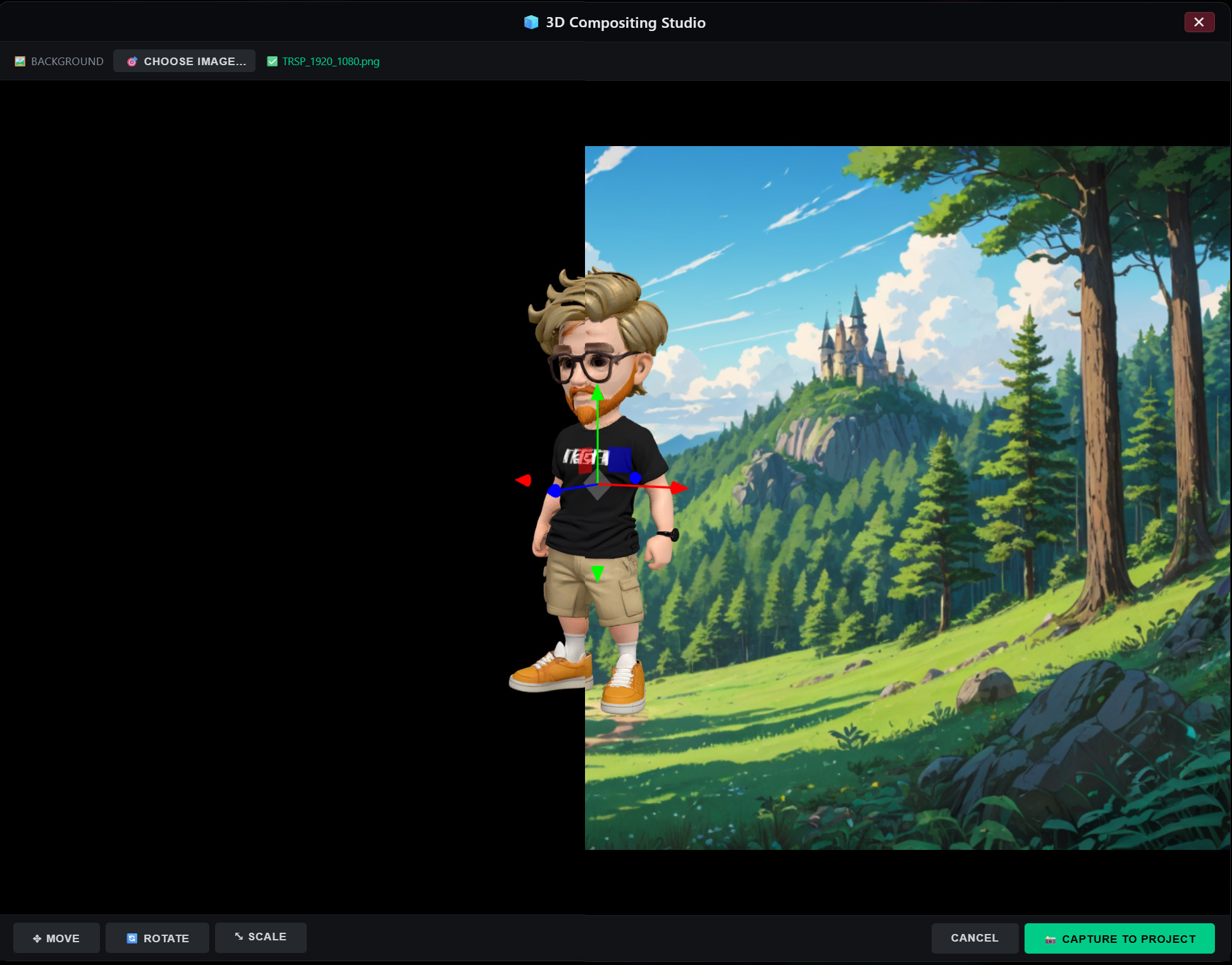
3D Model via Trellis.2
Most AI video tools treat the image as the final destination. You generate a still, you like it, and you use it as a reference or drop it into a timeline. The image is where the creative process stops. Latent Core’s 3D generation feature treats the image as a starting point instead: any image can be converted into a 3D model via Trellis.2, opening the door to angles, rotations, and composites that a flat image can never provide.
Why 3D Matters in a 2D Pipeline
It’s worth asking why a video generation tool would invest in 3D at all. The answer lies in the consistency problem that plagues 2D generation. A character generated in 2D is anchored to a single viewpoint. Ask the model for a three-quarter view and it has to invent what the face looks like from that angle, and the invention may not match the front view. Ask for a back view and the invention is even more speculative. Each new angle is a fresh guess, and the character drifts.
A 3D model has no such problem, because the geometry is fixed. Rotate the model and you see the actual back of the head, the actual profile, the actual three-quarter view — not a plausible reconstruction but the same object from a different position. For a character that needs to appear from multiple angles across a sequence, that geometric consistency is worth more than any amount of prompt engineering.
This is why 3D generation sits upstream of the Compositing Studio in Latent Core’s pipeline. The studio’s 2D → 3D → 2D workflow begins with a 3D model, and that model comes from Trellis.2. The chain is: image → 3D model → posed composite → 2D reference → video. Each step adds a kind of control that the previous step couldn’t provide.
How Trellis.2 Fits the Workflow
The feature is reached through the Asset Manager, in the asset editor for any character, location, or object. If the asset has a reference image, you can generate a 3D model from it. Trellis.2 processes the image and produces a 3D representation that can then be previewed with 👁️ Preview 3D, which opens the Compositing Studio with the model loaded.
From there, the workflow is the one described in the Compositing Studio section: choose a background, navigate in true 3D, use the transform gizmo to move, rotate, and scale the model, and capture the composite as a new 2D PNG at the background’s exact resolution and aspect ratio. The captured image becomes a standard media asset — assignable as a presenter reference, usable as a background, or feedable into the V2V Editor as a guide.
The significance of “any image” deserves emphasis. The input doesn’t have to be a clean product shot on a white background. It can be a generated character portrait, a frame captured from a video preview with the 📸 button, an image pulled from the NDI Monitor, or a photo uploaded from disk. Whatever is in your media library can become a 3D model, which means the 3D pipeline is available for every asset you build, not just the ones that happened to start as 3D-friendly source material.
The Practical Benefits
The first benefit is angle variety without identity drift. A character asset with a 3D model can be posed at a close-up three-quarter angle for one shot and a wide profile for another, and both composites will depict the same person. The Multi-Angles Generator addresses this need with 2D generation across ten camera positions, and the 3D path offers a complementary approach: geometric posing for the shots where precision matters most.
The second benefit is set design. A prop generated as a 3D model can be placed exactly where you want on a background — the vintage car example from the User Guide — and captured as a composite that LTX treats as an ordinary background image. The placement is controlled rather than described, so the result looks designed rather than generated.
The third benefit is technical. Because the capture uses the background’s exact aspect ratio and resolution, the composite is broadcast-ready by construction. There’s no cropping, no letterboxing, no discovering after export that the element doesn’t fit the delivery format.
Where It Fits in the Larger Architecture
Trellis.2 is one component in a pipeline where every part runs locally. The 3D generation happens on your GPU, like the script generation, the video generation, and the compositing. There’s no upload to a 3D service, no API call, no token cost. The model files live in your local ComfyUI installation, and the generated 3D assets are stored in your project folder alongside everything else.
That architectural consistency matters for the privacy and cost claims that define the product. If 3D generation were a cloud dependency, the “100% local processing” guarantee would have an asterisk. If it were billed per model, the “zero token costs” claim would have an exception. Because it runs through the same local stack as everything else, it inherits both guarantees without qualification.
A Note on Scope
It’s worth being precise about what this feature is and isn’t. It’s not a full 3D modeling environment — you don’t sculpt, rig, or animate the model. It’s a conversion and posing tool: image in, 3D model out, posed composite captured back to 2D. The value is in the middle step, where the model can be rotated and positioned with real geometry before being flattened back into the 2D pipeline.
That scope is appropriate for the workflow it serves. The goal isn’t to make Latent Core into a 3D suite; it’s to give the video generation pipeline access to the consistency that 3D provides, without asking the user to leave the application or learn a new discipline. Any image becomes a 3D model, the model becomes a posed composite, and the composite becomes a shot. The chain is short, the controls are familiar, and the result is a kind of consistency that 2D generation alone can’t reliably produce.